How to set weekly and monthly discounts
Longer stays mean fewer turnovers, fewer cleanings, and fewer empty nights between guests. A length-of-stay discount rewards guests who book a week or a month, and it's applied automatically at checkout.
Updated October 2026 · 3 min read
A length-of-stay discount takes a percentage off each night when a guest books long enough. A weekly discount covers stays of 7 nights or more, and a monthly discount covers stays of 28 nights or more. Guests don't need a code.
How it works
| Stay length | Discount applied | Example at $260/night |
|---|---|---|
| 1–6 nights | None | $260/night |
| 7–27 nights | Weekly discount | 10% off → $234/night |
| 28+ nights | Monthly discount (replaces weekly) | 20% off → $208/night |
The discount comes off the nightly rate of every eligible night in the stay, so the guest sees a lower price per night and a clear savings line before they pay.
Set up weekly and monthly discountsAbout 2 minutes
Open your property's Pricing tab
In your dashboard, go to Property, choose the property in the selector at the top of the sidebar, and open the Pricing tab.
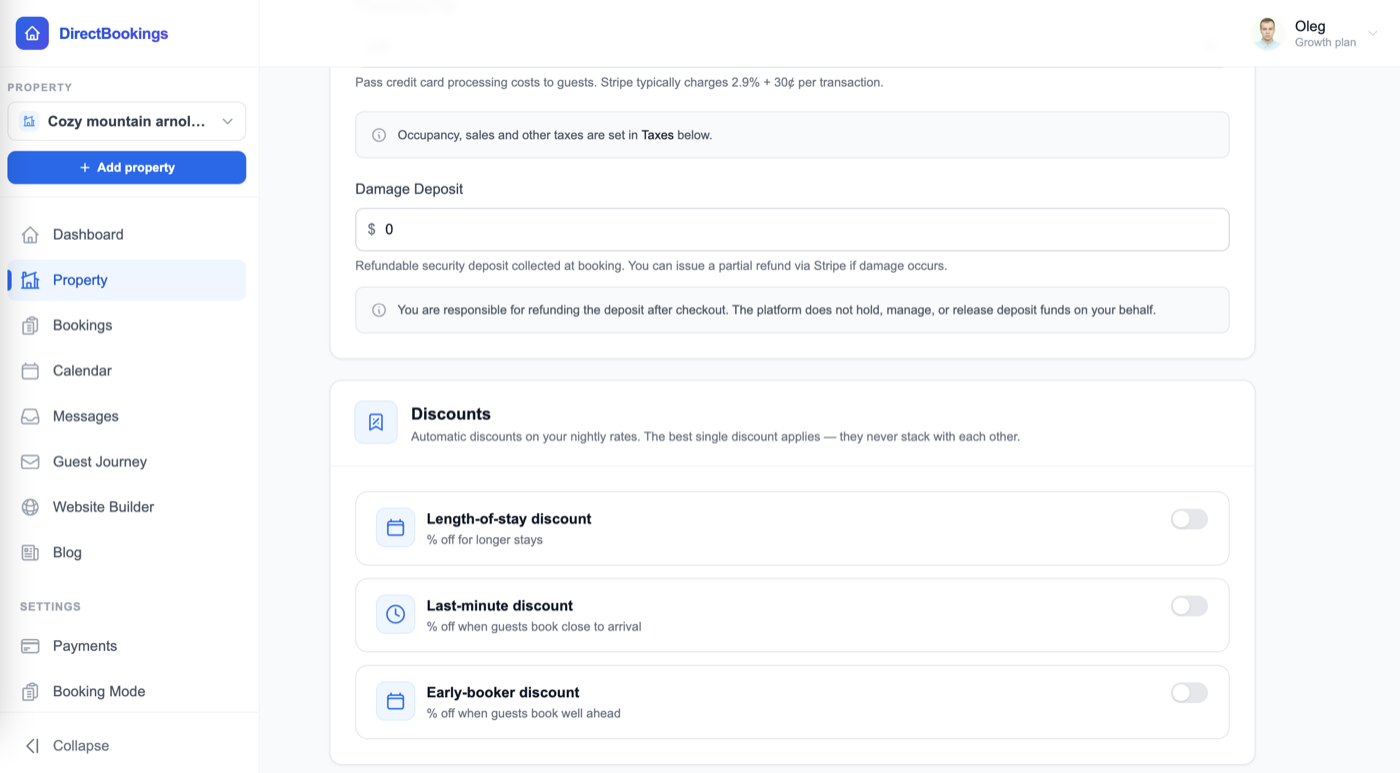
Find the Discounts panel
Scroll down past your fees and damage deposit to Discounts. It holds all three automatic discounts: Length-of-stay, Last-minute, and Early-booker.
Turn on Length-of-stay discount
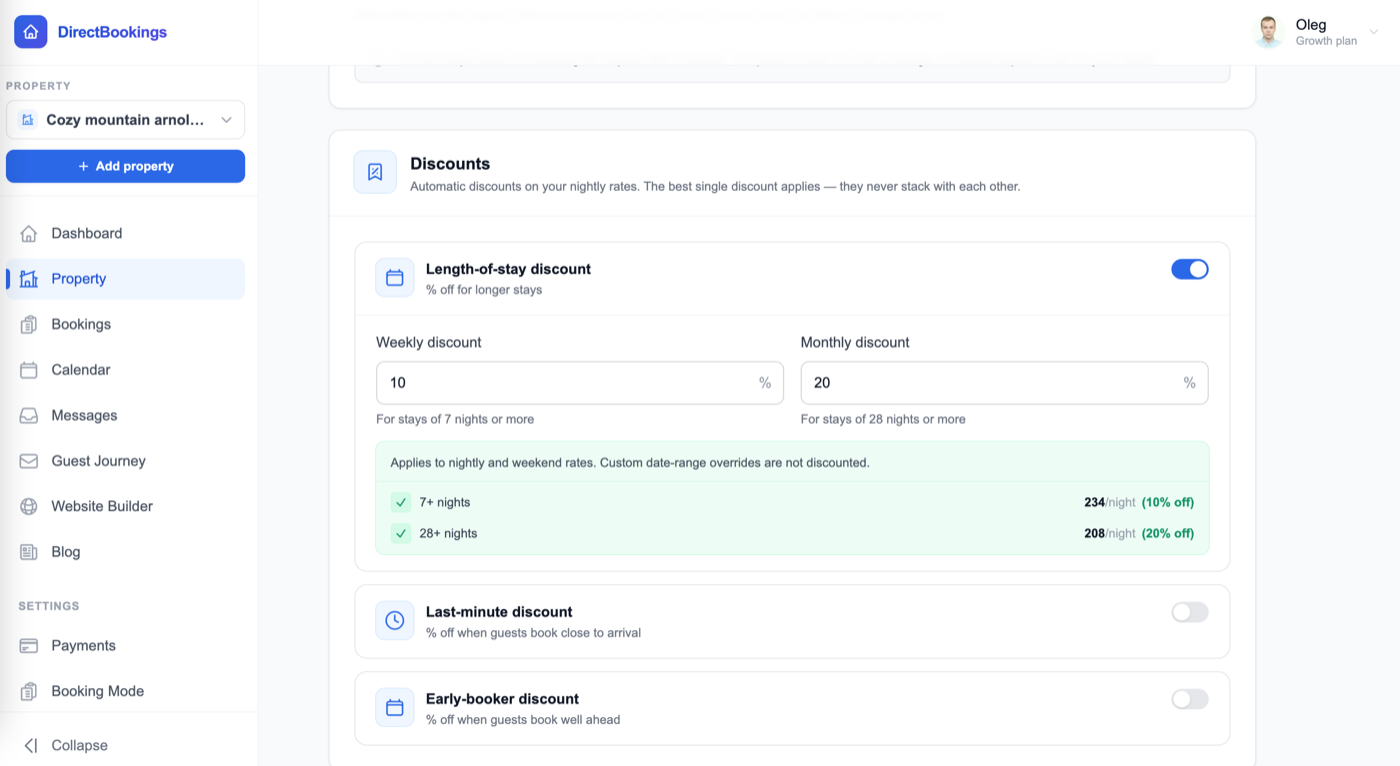
Flip the switch on the Length-of-stay discount card. The Weekly discount and Monthly discount fields appear.
Enter your percentages
- Weekly discount — % off for stays of 7 nights or more.
- Monthly discount — % off for stays of 28 nights or more.
Use whole numbers. You can fill in one or both. A green preview shows what guests will pay per night at your base rate, for example 7+ nights: 234/night (10% off) and 28+ nights: 208/night (20% off) on a $260 base rate.
Save
Click Save at the bottom of the page. From then on, every qualifying stay on your website and booking widget gets the discount automatically.
What guests see
When a guest picks dates that qualify, the booking summary shows the discounted nightly rates and a green savings line, like “Weekly discount (10% off) — you save $346.00”. The same numbers are used for the payment, so what the guest sees is what they're charged.
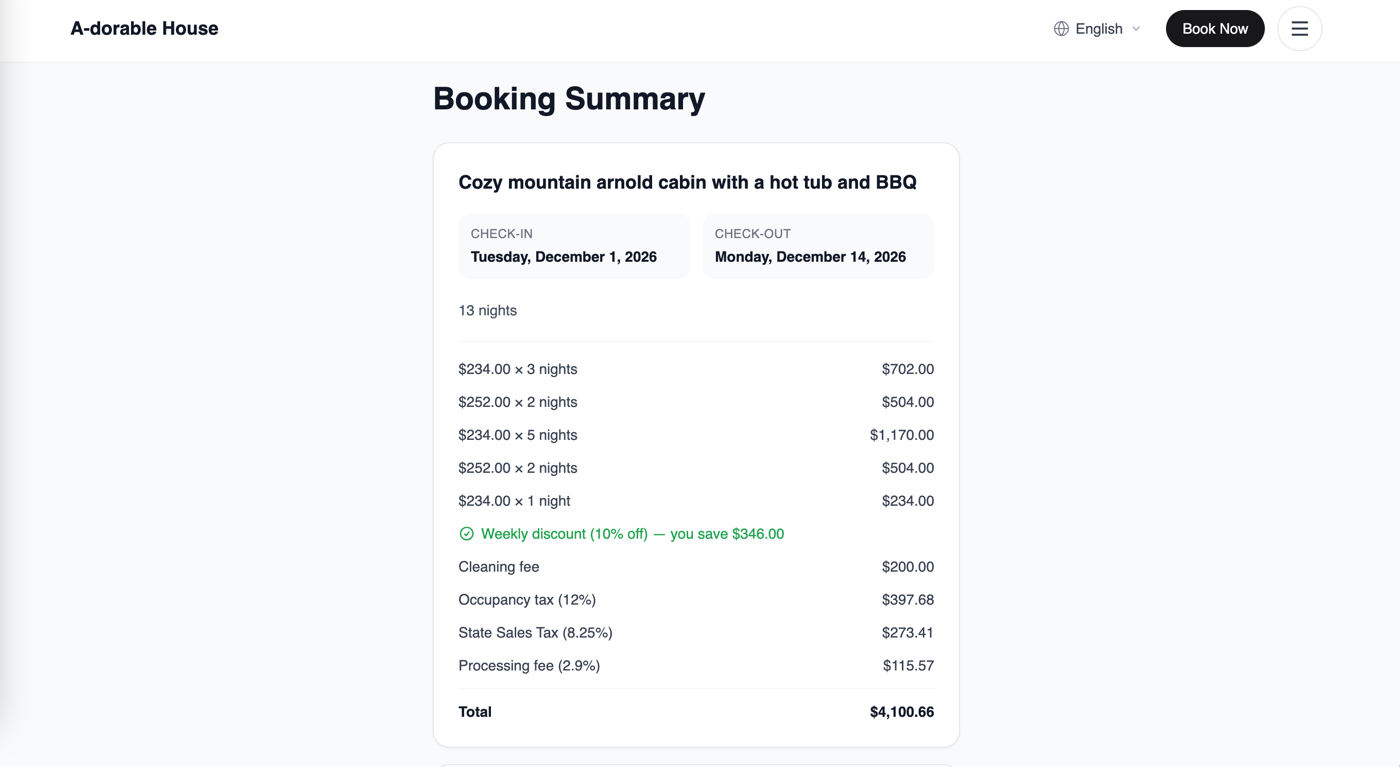
Here's how that example adds up:
| Nights | Standard rate | With 10% off |
|---|---|---|
| 9 weekday nights | 9 × $260 = $2,340 | 9 × $234 = $2,106 |
| 4 weekend nights | 4 × $280 = $1,120 | 4 × $252 = $1,008 |
| 13 nights | $3,460 | $3,114 (guest saves $346) |
The $200 cleaning fee isn't discounted. Taxes are worked out on the discounted total, so the 12% occupancy tax is charged on $3,114 + $200, not on the full-price stay.
What gets discounted
| Price | Discounted? |
|---|---|
| Base nightly rate | Yes |
| Weekend rate (Friday and Saturday nights) | Yes |
| Prices synced from PriceLabs | Yes |
| Custom date-range rates you set by hand | No. They stay at the exact price you set. |
| Cleaning, pet, and extra-guest fees | No |
| Damage deposit | No |
| Taxes and processing fee | Not directly, but they're calculated on the lower total, so they drop too |
A 10-night stay that overlaps your Christmas week custom rate gets the weekly discount on every night except the Christmas-rate nights. That's what the card means by “Custom date-range overrides are not discounted.” See custom rates and seasonal prices.
Weekly vs monthly: which one applies
The two never add together. The stay length decides which one is used:
- 7 to 27 nights → the weekly discount.
- 28 nights or more → the monthly discount, if you've set one. If the monthly field is empty, the weekly discount applies instead.
Because a 28+ night stay uses the monthly percentage whenever it's set, keep your monthly discount at least as high as your weekly discount. Otherwise a 28-night stay would cost more per night than a 27-night one.
How it works with other discounts
Length-of-stay sits in the same panel as the last-minute and early-booker discounts. They never stack with each other. When a stay qualifies for more than one, the guest gets the single largest percentage, applied once.
| Stay qualifies for | Guest gets |
|---|---|
| Weekly 10% and last-minute 15% | 15% (last-minute) |
| Monthly 20% and early-booker 5% | 20% (monthly) |
| Weekly 10% and last-minute 10% | 10% (a tie goes to length-of-stay) |
A discount code is different. The guest enters it on purpose, so it applies on top of whichever automatic discount won.
Choosing your percentages
There's no single right number, but many hosts start around 5–15% weekly and 15–30% monthly, then adjust based on bookings. A few things to weigh:
- Turnover costs. Each stay you avoid saves a cleaning and a gap night. A discount smaller than those savings still comes out ahead.
- Season. In peak season you may not need a discount at all. Lock in the price for your busiest dates with a custom rate, which the discount won't touch.
- Your market. Check what similar listings near you charge for a week or a month, and price your direct site to be the better deal.
Troubleshooting
The discount isn't showing on a 7-night stay
Check the stay is really 7 nights. The checkout day doesn't count as a night, so Monday to the following Monday is 7 nights, but Monday to Sunday is 6. Then make sure the card is switched on, the weekly field has a number above 0, and you clicked Save.
Some nights in the stay aren't discounted
Those nights are covered by a custom date-range rate you set by hand. That price is kept exactly as you set it.
The guest got a different percentage than I expected
A last-minute or early-booker discount with a higher percentage won instead. Only the largest automatic discount applies.
A 30-night stay gets a smaller discount than a 20-night stay
Your monthly discount is lower than your weekly discount. Raise the monthly percentage so it matches or beats the weekly one.
The preview shows a different rate than my weekend price
The preview on the card uses your base nightly rate as an example. Weekend nights are discounted by the same percentage from your weekend rate.
Frequently asked questions
Do guests need a code to get the weekly or monthly discount?
No. It's automatic. As soon as a guest picks dates that add up to 7 or more nights (or 28 or more for the monthly discount), the booking summary shows the discount and how much they save.
Do the weekly and monthly discounts add up on a long stay?
No. A stay of 28 nights or more gets the monthly discount instead of the weekly one, never both. Stays of 7 to 27 nights get the weekly discount.
What if my monthly discount is lower than my weekly discount?
A 28+ night stay always uses the monthly percentage when one is set, even if it's lower. Set your monthly discount equal to or higher than your weekly discount so longer stays never cost more per night. If you leave monthly empty, 28+ night stays get the weekly discount.
Does the discount apply to my weekend rate?
Yes. It applies to your base nightly rate and your weekend rate. Prices synced from PriceLabs are discounted too.
Why weren't some nights discounted?
Nights covered by a custom date-range rate you set by hand are never discounted. That rate is treated as your exact price for those dates. Every other night in the stay still gets the discount.
Is the cleaning fee discounted?
No. Only nightly rates are discounted. Cleaning, pet, and extra-guest fees and the damage deposit stay the same. Taxes and the processing fee are calculated on the lower, discounted total, so they drop too.
Can a guest use a discount code on top of the weekly discount?
Yes. A discount code is a separate step that the guest chooses, so it applies after the weekly or monthly discount.
How does this work with last-minute and early-booker discounts?
Only one automatic discount applies to a stay: the one with the largest percentage. If a 10-night stay qualifies for a 10% weekly discount and a 15% last-minute discount, the guest gets 15%. On a tie, the length-of-stay discount wins.
Does this change my prices on Airbnb or VRBO?
No. These discounts apply to bookings on your own DirectBookings website and booking widget. Set long-stay discounts on each channel separately.
How do I turn the discount off?
Switch off the Length-of-stay discount card and click Save. Both percentages are cleared, and new bookings pay your standard rates.
Fill your calendar with longer stays
Set weekly and monthly discounts, sync your calendars, and take direct bookings with zero commission. $9/month, 5-day free trial.
Open your dashboard →