How to set last-minute and early-booker discounts
Empty nights next week earn nothing, and bookings made months ahead let you plan with confidence. Reward both with an automatic discount based on how far ahead the guest books.
Updated October 2026 · 3 min read
Both discounts are based on the booking window: the number of days between the day a guest books and their check-in. Set the days and the % off once, and qualifying guests get the discount automatically. No code needed.
How it works
| Discount | Applies when check-in is | Good for | Example |
|---|---|---|---|
| Last-minute | This many days away or fewer | Filling gap nights and quiet weeks | 15% off within 14 days |
| Early-booker | This many days away or more | Locking in bookings and cash flow early | 5% off at 90+ days |
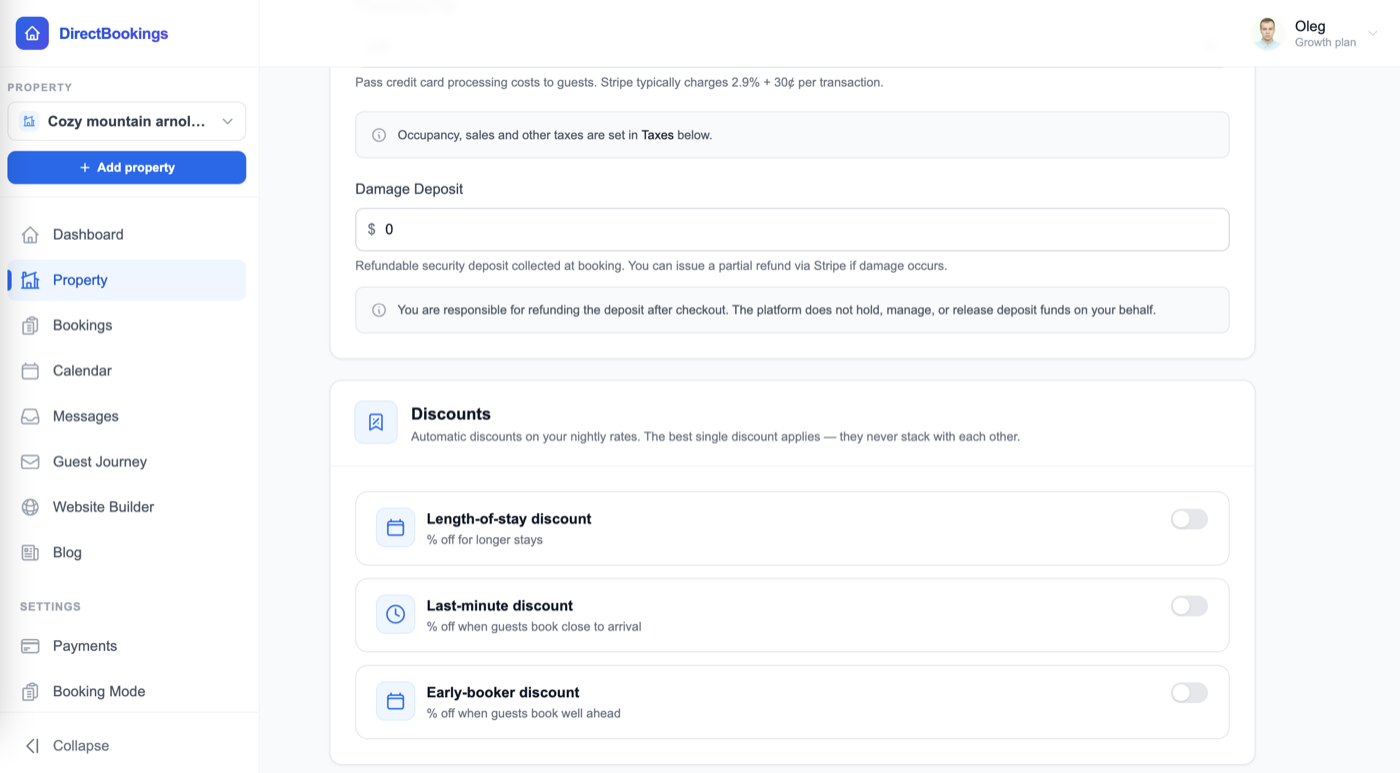
Both live in the Discounts panel on your property's Pricing tab, next to the weekly and monthly discounts.
Set a last-minute discountAbout 1 minute
Open your property's Pricing tab
In your dashboard, go to Property, choose the property in the selector at the top of the sidebar, open the Pricing tab, and scroll to Discounts.
Turn on Last-minute discount
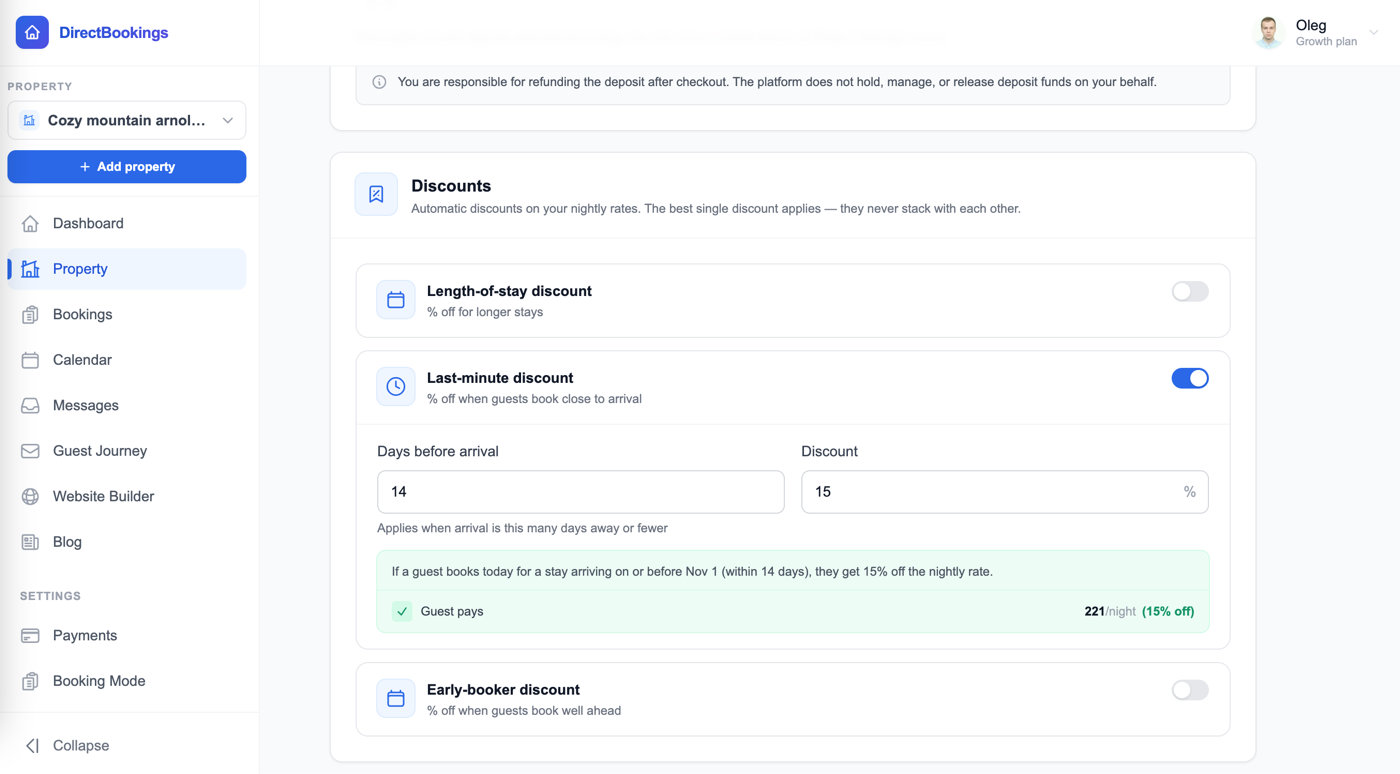
Flip the switch on the Last-minute discount card, “% off when guests book close to arrival.”
Set days before arrival and the discount
- Days before arrival — the discount applies when check-in is this many days away or fewer. For example, 14.
- Discount — the % off the nightly rate. For example, 15.
The green preview spells out the rule with a real date, like “If a guest books today for a stay arriving on or before Nov 1 (within 14 days), they get 15% off the nightly rate,” and shows what the guest pays per night.
Save
Click Save at the bottom of the page. The discount is live for new bookings on your website and booking widget.
Set an early-booker discountAbout 1 minute
Turn on Early-booker discount
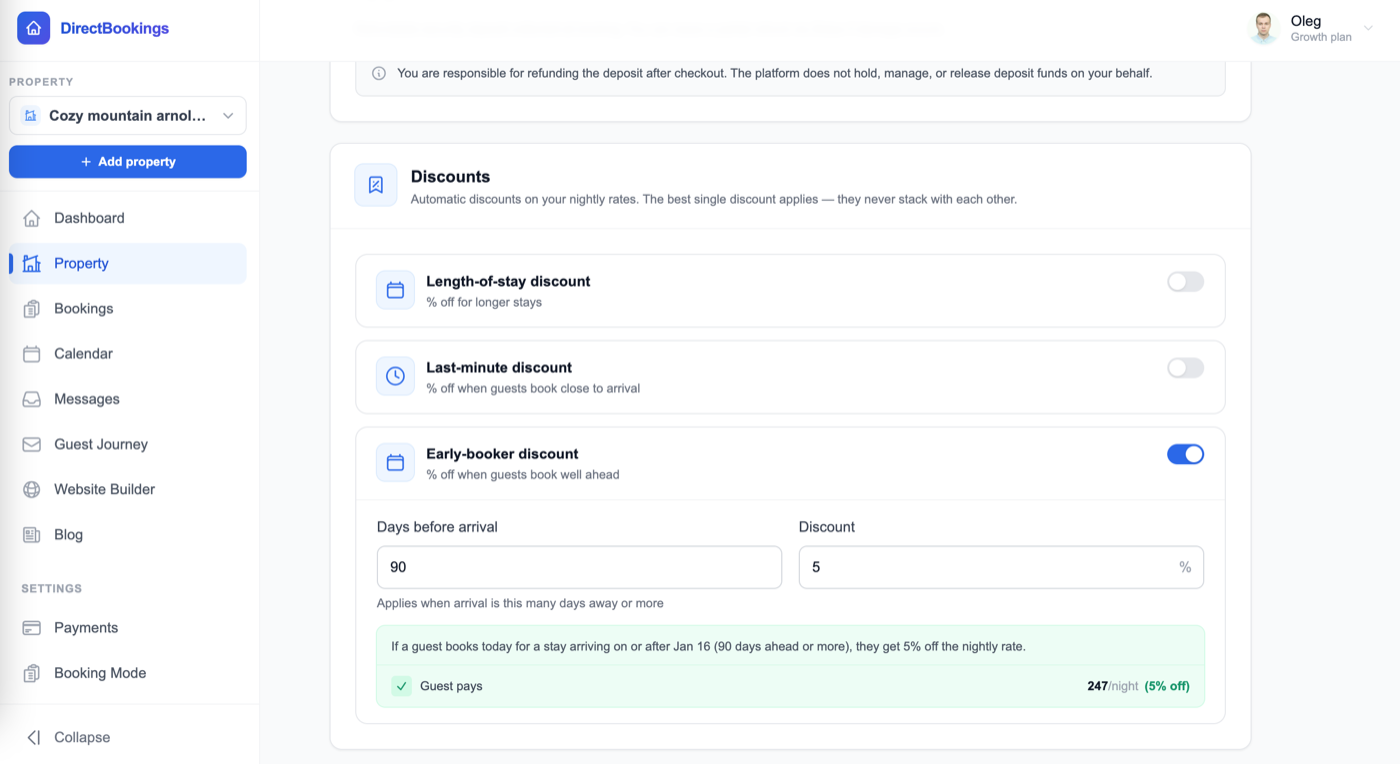
In the same Discounts panel, flip the switch on the Early-booker discount card, “% off when guests book well ahead.”
Set days before arrival and the discount
- Days before arrival — the discount applies when check-in is this many days away or more. For example, 90.
- Discount — the % off the nightly rate. For example, 5.
The preview reads, for example, “If a guest books today for a stay arriving on or after Jan 16 (90 days ahead or more), they get 5% off the nightly rate.”
Save
Click Save. You can run the early-booker and last-minute discounts at the same time.
How days are counted
The booking window is the number of calendar days from the day the guest books to their check-in date. Booking on the day of arrival counts as 0 days.
| Guest books on | Check-in | Days away | Last-minute (≤14) | Early-booker (≥90) |
|---|---|---|---|---|
| Oct 18 | Oct 18 | 0 | Yes | No |
| Oct 18 | Nov 1 | 14 | Yes | No |
| Oct 18 | Nov 2 | 15 | No | No |
| Oct 18 | Jan 16 | 90 | No | Yes |
“Today” is the date in your property's time zone (set on the Location tab), taken on our server. A guest in another time zone, or one who changes their device clock, can't move the date to unlock a discount.
What gets discounted
The percentage comes off every eligible night in the stay, the same way the length-of-stay discount does.
| Price | Discounted? |
|---|---|
| Base nightly rate and weekend rate | Yes |
| Prices synced from PriceLabs | Yes |
| Custom date-range rates you set by hand | No. They stay at the exact price you set. |
| Cleaning, pet, and extra-guest fees, and the damage deposit | No |
| Taxes and processing fee | Calculated on the lower, discounted total |
Guests see a green line in their booking summary, like “Last-minute discount (15% off) — you save $X” or “Early-booker discount (5% off) — you save $X”. The same calculation is used for the payment.
How it works with other discounts
Automatic discounts never stack. When a stay qualifies for more than one, the guest gets the single largest percentage, applied once.
| Stay qualifies for | Guest gets |
|---|---|
| Last-minute 15% and weekly 10% | 15% (last-minute) |
| Early-booker 5% and monthly 20% | 20% (monthly) |
| Last-minute 10% and weekly 10% | 10% (a tie goes to length-of-stay) |
A discount code the guest enters is separate and applies on top of whichever automatic discount won.
Ideas to get started
| Goal | Setting to try |
|---|---|
| Fill gaps in the next week or two | Last-minute: 10–20% at 7–14 days |
| Rescue a last-minute empty weekend | Last-minute: 15–25% at 3 days |
| Lock in summer bookings in spring | Early-booker: 5–10% at 90–120 days |
| Reward guests who plan holidays early | Early-booker: 5% at 180 days |
Want full price on your busiest dates no matter when guests book? Set a custom rate for those dates. Custom rates you set by hand are never discounted.
Troubleshooting
A guest booking next week didn't get the last-minute discount
Count the days from today to check-in. If it's more than your threshold, it doesn't qualify. Also check the card is switched on and you clicked Save.
The guest got a different percentage
A weekly or monthly discount with a higher percentage won instead. Only the largest automatic discount applies.
Some nights in the stay aren't discounted
Those nights have a custom date-range rate you set by hand. That price is kept exactly as you set it.
Save does nothing or shows an error
Days before arrival must be a whole number from 1 to 365, and the discount a whole number from 1 to 99. Fix the highlighted field and save again.
The date in the preview looks a day off
The preview uses your device's date. Real bookings use the date in your property's time zone. Check the time zone on the Location tab.
Frequently asked questions
What's the difference between a last-minute and an early-booker discount?
A last-minute discount rewards guests who book close to arrival, for example 15% off when check-in is 14 days away or fewer. An early-booker discount rewards guests who book well ahead, for example 5% off when check-in is 90 days away or more.
Is it based on when the guest books or when they arrive?
Both. It counts the days between the day the guest books and their check-in date. A stay in July gets the early-booker discount if it's booked in March, but not if it's booked in late June.
Which time zone is "today"?
Your property's time zone, set on the Location tab. The date is taken on our server, so guests can't change their device clock to unlock a discount.
Can I use both a last-minute and an early-booker discount?
Yes, you can turn on both. They cover opposite ends of the calendar, so most stays only qualify for one. If a stay ever qualifies for both, the larger percentage applies.
Do they stack with my weekly or monthly discount?
No. Only one automatic discount applies to a stay: the largest percentage. A 10-night stay that qualifies for a 10% weekly discount and a 15% last-minute discount gets 15%. On a tie, the length-of-stay discount wins.
Does a guest need a code?
No. It's automatic. If a guest also has a discount code, the code applies on top of the automatic discount.
What does the discount apply to?
Your base nightly rate, weekend rate, and PriceLabs-synced prices. Custom date-range rates you set by hand, cleaning and other fees, and the damage deposit are never discounted. Taxes are calculated on the discounted total.
What are the limits on days and percentages?
Days before arrival can be any whole number from 1 to 365. The discount can be any whole number from 1% to 99%.
Does this change my prices on Airbnb or VRBO?
No. These discounts apply to bookings on your own DirectBookings website and booking widget. Set channel promotions on each channel separately.
Fill gaps and lock in bookings early
Set automatic discounts, sync your calendars, and take direct bookings with zero commission. $9/month, 5-day free trial.
Open your dashboard →